
Lincoln Corsair: Electronic Engine Controls - 2.0L EcoBoost (177kW/240PS) – MI4 / Removal and Installation - Turbocharger Bypass Valve
Lincoln Corsair 2020-2026 Service Manual / Powertrain / Engine / Electronic Engine Controls - 2.0L EcoBoost (177kW/240PS) – MI4 / Removal and Installation - Turbocharger Bypass Valve
Materials
| Name | Specification |
|---|---|
| Motorcraft® Silicone Brake Caliper Grease and Dielectric Compound XG-3-A |
ESA-M1C200-A ESE-M1C171-A |
Removal
NOTE: Removal steps in this procedure may contain installation details.
-
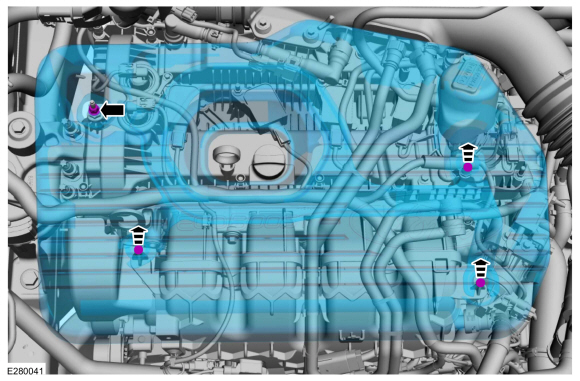
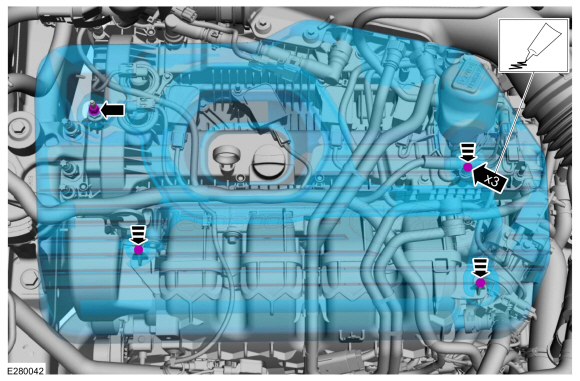
NOTICE: Do not pull the engine appearance cover forward or sideways to remove. Failure to press straight upward on the underside of the cover at the attachment points may result in damage to the cover or engine components.
-
Remove the engine appearance cover nut.
-
Place your hand under the engine appearance cover at
each grommet location and pull straight up to release each grommet from
the studs.
-
After all of the grommets have been released from the studs, remove the appearance cover from the engine.
-
Remove the engine appearance cover nut.
 |
-
-
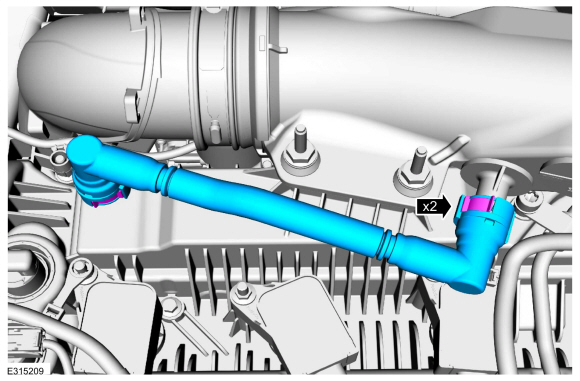
Remove the crankcase vent tube.
Refer to: Quick Release Coupling (310-00 Fuel System - General Information - 2.0L EcoBoost (177kW/240PS) - MI4) .
-
Remove the crankcase vent tube.
 |
-
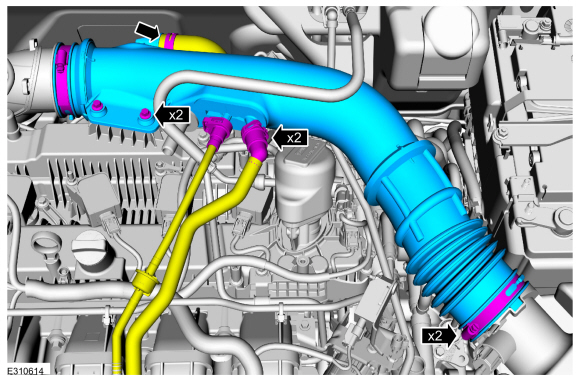
Remove the air cleaner outlet pipe.
-
Disconnect the vent tubes.
Refer to: Quick Release Coupling (310-00 Fuel System - General Information - 2.0L EcoBoost (177kW/240PS) - MI4) .
-
Loosen the clamps.
Torque: 44 lb.in (5 Nm)
-
Remove the bolts and the air cleaner outlet tube.
Torque: 62 lb.in (7 Nm)
-
Disconnect the vent tubes.
 |
-
-
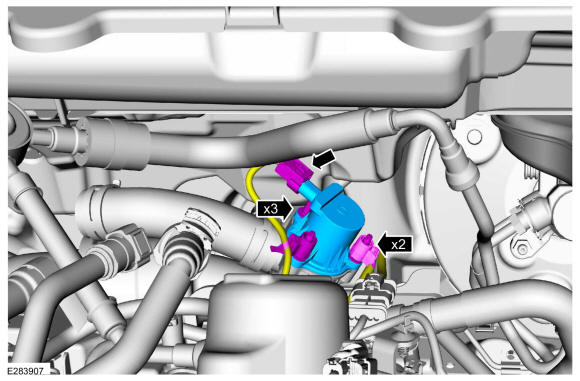
Disconnect the electrical connector and harness retainers.
-
Remove the bolts and the turbocharger bypass valve.
Torque: 71 lb.in (8 Nm)
-
Disconnect the electrical connector and harness retainers.
 |
Installation
-
To install, reverse the removal procedure.
-
-
NOTE: Lubricating the grommets with silicone grease will aid in the installation of the engine appearance cover, and any future removal and installation of the cover.
Lubricate each grommet with silicone grease.
Material: Motorcraft® Silicone Brake Caliper Grease and Dielectric Compound / XG-3-A (ESA-M1C200-A) (ESE-M1C171-A)
-
Position the engine appearance cover onto engine with the grommets aligned with the studs.
-
Press down on the engine appearance cover at each grommet location to attach the grommets onto the studs.
-
Install the engine appearance cover nut.
Torque: 44 lb.in (5 Nm)
-
If the engine appearance cover stud bolt is loosened
or removed, it must be installed/tightened into the valve cover.
Torque: 62 lb.in (7 Nm)
-
 |
 Removal and Installation - Powertrain Control Module (PCM)
Special Tool(s) /
General Equipment
Ford Diagnostic Equipment
Removal
NOTE:
Removal steps in this procedure may contain installation details...
 Removal and Installation - Variable Camshaft Timing (VCT) Oil Control Solenoid
Removal
NOTE:
Removal steps in this procedure may contain installation details.
Remove the valve cover.
Refer to: Valve Cover (303-01A Engine - 2...
Other information:
Lincoln Corsair 2020-2026 Owners Manual: Safety Practices
WARNING: If your vehicle is stuck in snow, mud or sand, do not rapidly spin the tires; spinning the tires can tear the tire and cause an explosion. A tire can explode in as little as three to five seconds. WARNING: Do not spin the wheels at over 34 mph (55 km/h)...
Lincoln Corsair 2020-2026 Owners Manual: Autowipers (IF EQUIPPED)
Wet or winter driving conditions with ice, snow or salty road mist can cause inconsistent and unexpected wiping or smearing. Autowipers On. High sensitivity. Low sensitivity. Use the rotary control to adjust the sensitivity of the autowipers...
Categories
- Manuals Home
- 1st Generation Lincoln Corsair Owners Manual
- 1st Generation Lincoln Corsair Service Manual
- Interior Lamps
- Programming the Garage Door Opener to Your Garage Door Opener Motor
- Memory Function
- New on site
- Most important about car
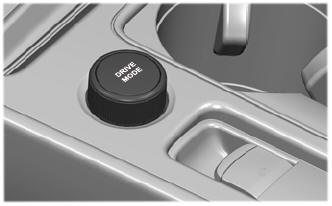
Selecting a Drive Mode. DRIVE MODES
Selecting a Drive Mode
Note: Drive mode changes may not be available when the ignition is off.

Copyright © 2026 www.licorsair.com