
Lincoln Corsair: Automatic Transmission - 8-Speed Automatic Transmission – 8F35/8F40 / Removal and Installation - Transmission Internal Wiring Harness Frame
Lincoln Corsair 2020-2026 Service Manual / Powertrain / Automatic Transmission / Automatic Transmission - 8-Speed Automatic Transmission – 8F35/8F40 / Removal and Installation - Transmission Internal Wiring Harness Frame
Removal
-
Remove the main control cover.
Refer to: Main Control Cover (307-01A Automatic Transmission - 8-Speed Automatic Transmission – 8F35/8F40, Removal and Installation).
-
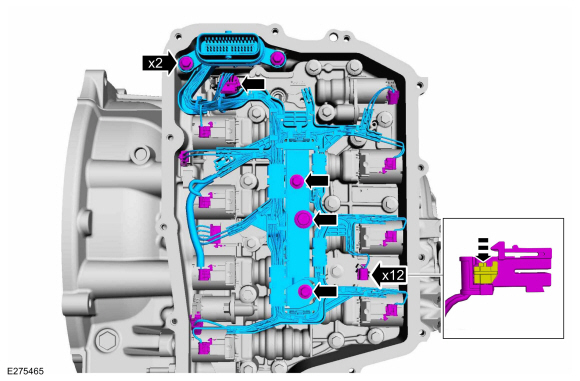
Disconnect the TR sensor electrical connector, disconnect the OSS
sensor electrical connector, disconnect the connectors from the
solenoids, remove the bolts and the wiring harness frame.
 |
Installation
-
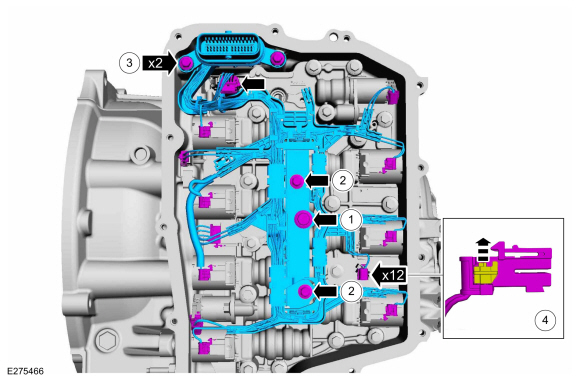
Connect the TR sensor electrical connector, connect the OSS sensor
electrical connector, connect the connectors to the solenoids, install
the bolts and the wiring harness frame.
- Torque: 89 lb.in (10 Nm)
-
Torque:
Stage 1: 44 lb.in (5 Nm)
Stage 2: 62 lb.in (7 Nm)
- Torque: 71 lb.in (8 Nm)
 |
-
Install the main control cover.
Refer to: Main Control Cover (307-01A Automatic Transmission - 8-Speed Automatic Transmission – 8F35/8F40, Removal and Installation).

 Removal and Installation - Transmission Range (TR) Sensor
Special Tool(s) /
General Equipment
Punch
Removal
Remove the main control valve body.
Refer to: Main Control Valve Body (307-01A Automatic Transmission -
8-Speed Automatic Transmission – 8F35/8F40, Removal and Installation)...
Other information:
Lincoln Corsair 2020-2026 Service Manual: Removal and Installation - Rear Stabilizer Bar Link
Removal NOTE: Removal steps in this procedure may contain installation details. With the vehicle in NEUTRAL, position it on a hoist. Refer to: Jacking and Lifting (100-02 Jacking and Lifting) . NOTICE: Do not use power tools to remove or install the stabilizer bar link nuts...
Lincoln Corsair 2020-2026 Owners Manual: Switching Active Park Assist On and Off. Entering a Parallel Parking Space
Switching Active Park Assist On and Off Press the active park assist button, then press the active park assist icon on the touchscreen to bring up full screen notifications. Press the soft keys on the touchscreen to switch between the parallel park in, perpendicular park in, or parallel park out parking modes...
Categories
- Manuals Home
- 1st Generation Lincoln Corsair Owners Manual
- 1st Generation Lincoln Corsair Service Manual
- Fuel Quality - Gasoline
- Head Up Display
- Exterior Mirrors
- New on site
- Most important about car
USB Port
WARNING: Driving while distracted can result in loss of vehicle control, crash and injury. We strongly recommend that you use extreme caution when using any device that may take your focus off the road. Your primary responsibility is the safe operation of your vehicle. We recommend against the use of any hand-held device while driving and encourage the use of voice-operated systems when possible. Make sure you are aware of all applicable local laws that may affect the use of electronic devices while driving.
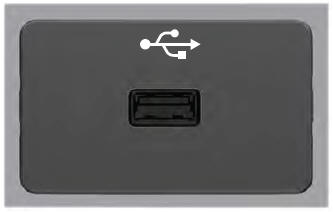
USB A

Copyright © 2026 www.licorsair.com