
Lincoln Corsair: Interior Trim and Ornamentation / Removal and Installation - Liftgate Trim Panel
Lincoln Corsair 2020-2026 Service Manual / Body and Paint / Body and Paint / Interior Trim and Ornamentation / Removal and Installation - Liftgate Trim Panel
Special Tool(s) / General Equipment
| Interior Trim Remover |
Removal
-
Release the clips and remove the liftgate center upper trim panel.
Use the General Equipment: Interior Trim Remover
.jpg) |
-
Release the clips and remove the liftgate RH upper trim panel.
Use the General Equipment: Interior Trim Remover
.jpg) |
-
Release the clips and remove the liftgate LH upper trim panel.
Use the General Equipment: Interior Trim Remover
.jpg) |
-
Remove the liftgate lower trim panel.
-
Release the liftgate lower trim panel clips.
Use the General Equipment: Interior Trim Remover
-
Release and discard the liftgate lower trim panel clip.
-
If equipped.
Disconnect the power liftgate lower switch electrical connector.
-
Release the liftgate lower trim panel clips.
.jpg) |
Installation
-
To install, reverse the removal procedure.
 Removal and Installation - Headliner - Lowering
Special Tool(s) /
General Equipment
Pick Hook
Interior Trim Remover
Remove the following items:
On both sides.
Remove the A-pillar trim panel...
 Removal and Installation - Loadspace Scuff Plate Trim Panel
Special Tool(s) /
General Equipment
Interior Trim Remover
Removal
NOTE:
Removal steps in this procedure may contain installation details...
Other information:
Lincoln Corsair 2020-2026 Service Manual: Removal and Installation - Fender Apron Panel Reinforcement
Special Tool(s) / General Equipment Resistance Spotwelding Equipment 8 mm Drill Bit MIG/MAG Welding Equipment Spot Weld Drill Bit Materials Name Specification Metal Bonding AdhesiveTA-1, TA-1-B, 3M™ 08115, LORD Fusor® 108B, Henkel Teroson EP 5055 - Removal WARNING: Electric vehicles damaged by a crash may have compromised high voltage..
Lincoln Corsair 2020-2026 Service Manual: Diagnosis and Testing - Active Grille Shutter
Diagnostic Trouble Code (DTC) Chart Diagnostics in this manual assume a certain skill level and knowledge of Ford-specific diagnostic practices. REFER to: Diagnostic Methods (100-00 General Information, Description and Operation). Module DTC Description Action PCM P059F:00 Active Grille Air Shutter 'A' Performance/Stuck Off: No Sub Type Information GO to Pinpoint Test A PCM..
Categories
- Manuals Home
- 1st Generation Lincoln Corsair Owners Manual
- 1st Generation Lincoln Corsair Service Manual
- Normal Scheduled Maintenance
- Fuel Quality - Gasoline
- Interior Lamps
- New on site
- Most important about car
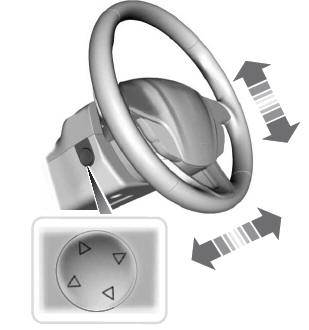
Adjusting the Steering Wheel - Vehicles With: Power Adjustable Steering Column
WARNING: Do not adjust the steering wheel when your vehicle is moving.
Note: Make sure that you are sitting in the correct position.

Copyright © 2026 www.licorsair.com