
Lincoln Corsair: Lighting / Interior Lamps
The lamps turn on under the following conditions:
- You open any door.
- You press a button on the remote control.
- You press the all lamps on button on the overhead console.
Front Interior Lamp
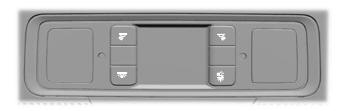
The front interior lamp switches are on the overhead console.
Note: The position of each button on the overhead console depends on your vehicle.
All Lamps On or Off
 Press to switch all interior
lamps
on or off.
Press to switch all interior
lamps
on or off.
Individual Map Lamps
 Press to switch the left-hand
individual dome lamp on and off.
Press to switch the left-hand
individual dome lamp on and off.
 Press to switch the right-hand
individual dome lamp on and off.
Press to switch the right-hand
individual dome lamp on and off.
Interior Lamp Function
 Press to switch the interior
lamp
function on and off.
Press to switch the interior
lamp
function on and off.
When the interior lamp function is off and you open a door, the courtesy and door lamps stay off.
When the interior lamp function is on and you open a door, the courtesy and door lamps turn on.
Note: The indicator lamp lights amber when the door function is off.
Rear Interior Lamps
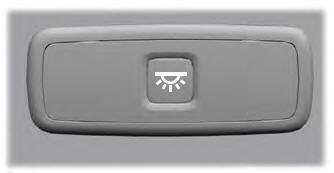
The rear interior lamps may be above the rear seat or above the rear windows.
 Press to switch the lamps on or
off.
Press to switch the lamps on or
off.
Note: If you switch the rear lamps on through the overhead console, you cannot switch them off with the rear lamp switch.
 Direction Indicators. Welcome Lighting
Direction Indicators
Push the lever up or down to use
the direction indicators.
Indicating a Lane Change
Tap the lever up or down to make the
direction indicators flash three times to
indicate a lane change...
 Ambient Lighting (IF EQUIPPED)
Use the touchscreen to select the following:
Select the settings option on
the
feature bar.
Select ambient lighting.
Switching Ambient Lighting On
Touch a color once...
Other information:
Lincoln Corsair 2020-2026 Service Manual: Removal and Installation - Engine Front Cover
Special Tool(s) / General Equipment 303-096 (T74P-6150-A) Installer, Camshaft Front Oil SealTKIT-2009TC-F 303-1521Alignment Tool, Crankshaft Position SensorTKIT-2010C-FLM 303-1685Alignment Tool, Camshaft 303-1689Holding Tool, Crank Damper 303-409 (T92C-6700-CH) Remover, Crankshaft SealTKIT-1992-FH/FMH/FLMHTKIT-1993-LMH/MH 303-507Timing Peg, Crankshaft ..
Lincoln Corsair 2020-2026 Service Manual: Removal and Installation - B-Pillar Outer Panel
Special Tool(s) / General Equipment Resistance Spotwelding Equipment Spherical Cutter Plasma Cutter Hot Air Gun Air Body Saw 8 mm Drill Bit MIG/MAG Welding Equipment Spot Weld Drill Bit Locking Pliers Materials Name Specification Metal Bonding AdhesiveTA-1, TA-1-B, 3M™ 08115, LORD Fusor® 108B, Henkel Teroson EP 5055 - Seam ..
Categories
- Manuals Home
- 1st Generation Lincoln Corsair Owners Manual
- 1st Generation Lincoln Corsair Service Manual
- Programming the Garage Door Opener to Your Hand-Held Transmitter
- Fuel Quality - Gasoline
- Overhaul - Main Control Valve Body
- New on site
- Most important about car
Creating a Vehicle Wi-Fi Hotspot
You can create a Wi-Fi hotspot in your vehicle and allow devices to connect to it for access to the Internet.
 Select the settings option on
the
feature bar.
Select the settings option on
the
feature bar.
