
Lincoln Corsair: Rear Electric Drive Assembly / Removal and Installation - Halfshaft Seal RH
Lincoln Corsair 2020-2026 Service Manual / Powertrain / Frame and Mounting / Rear Electric Drive Assembly / Removal and Installation - Halfshaft Seal RH
Special Tool(s) / General Equipment
 |
205-153
(T80T-4000-W)
Handle |
 |
205-990 Installer, Axle Seal TKIT-2012A-FL TKIT-2012A-ROW |
Removal
-
Remove the RH rear halfshaft.
Refer to: Rear Halfshaft (205-05 Rear Drive Halfshafts, Removal and Installation).
- Remove and discard the rear halfshaft seal.
 |
Installation
- Using the special tool, install the new rear halfshaft seal. Use Special Service Tool: 205-153 (T80T-4000-W) Handle. , 205-990 Installer, Axle Seal.
 |
-
Install the RH rear halfshaft.
Refer to: Rear Halfshaft (205-05 Rear Drive Halfshafts, Removal and Installation).
-
Check and top off the rear electric drive assembly oil level.
Refer to: Specifications (302-02)
.
Torque: 177 lb.in (20 Nm)
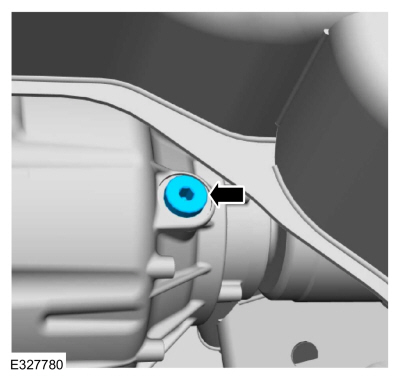 |
 General Procedures - Electric Drive Assembly Strategy Download
Configuration
NOTICE:
If the transmission strategy information is not correct,
transmission drivability concerns WILL occur. The scan tool verifies the
numbers entered are valid and will display a message if the information
is not valid...
 Removal and Installation - Intermediate Shaft Seal
Removal and Installation
In order to replace the intermediate shaft seal and the
dust shield, the seal and the dust shield is replaced by removing and
installing the intermediate shaft...
Other information:
Lincoln Corsair 2020-2026 Service Manual: Removal and Installation - Power Transfer Unit Input Shaft Seal LH
Special Tool(s) / General Equipment 204-069 (T81P-1104-C) Remover/Installer, Front Wheel Hub 205-153 (T80T-4000-W) Handle 307-557Installer, Ball BearingTKIT-2005U-FLMTKIT-2005U-LMTKIT-2006U-FLM/LMTKIT-2006UF/FM 308-968Installer, Input Shaft Seal 308-971Remover, Input Sleeve 308-972Installer, Input Sleeve 308-973Remover, PTU Input Sleeve Hyd..
Lincoln Corsair 2020-2026 Service Manual: Removal and Installation - Transmission Internal Wiring Harness Frame
Removal Remove the main control cover. Refer to: Main Control Cover (307-01A Automatic Transmission - 8-Speed Automatic Transmission – 8F35/8F40, Removal and Installation). Disconnect the TR sensor electrical connector, disconnect the OSS sensor electrical connector, disconnect the connectors from the solenoids, remove the bolts and the wiring harness frame. ..
Categories
- Manuals Home
- 1st Generation Lincoln Corsair Owners Manual
- 1st Generation Lincoln Corsair Service Manual
- Overhaul - Main Control Valve Body
- Automatic Transmission - 8-Speed Automatic Transmission – 8F35/8F40
- Auto Hold (IF EQUIPPED)
- New on site
- Most important about car
Keyless Starting
Note: The keyless starting system may not function if the key is close to metal objects or electronic devices such as cellular phones.
Note: A valid key must be located inside your vehicle to switch the ignition on and start the engine.
Ignition Modes

Copyright © 2026 www.licorsair.com