Lincoln Corsair: Parking Aids / Principle of Operation
WARNING: To help avoid personal injury, always use caution when in reverse (R) and when using the sensing system.
WARNING: The system may not detect objects with surfaces that absorb reflection. Always drive with due care and attention. Failure to take care may result in a crash.
WARNING: Traffic control systems, inclement weather, air brakes, external motors and fans may affect the correct operation of the sensing system. This may cause reduced performance or false alerts.
WARNING: The system may not detect small or moving objects, particularly those close to the ground. Note: If your vehicle has MyKey™, the sensing system cannot be switched off when a MyKey™ is present.
Note: Keep the sensors on the bumper or fascia free from snow, ice and large accumulations of dirt. If the sensors are covered, the system’s accuracy can be affected. Do not clean the sensors with sharp objects.
Note: If your vehicle sustains damage to the bumper or fascia, leaving it misaligned or bent, the sensing zone may be altered causing inaccurate measurement of obstacles or false alerts.
Note: Certain add-on devices installed around the bumper or fascia may create false alerts. For example, large trailer hitches, bike or surfboard racks, license plate brackets, bumper covers or any other device that may block the normal detection zone of the system. Remove the add-on device to prevent false alerts.
Note: When you connect a trailer to your vehicle, the rear parking aid may detect the trailer and therefore provide an alert. Disable the rear parking aid when you connect a trailer to prevent the alert.
The sensing system warns the driver of obstacles within a certain range of your vehicle. The system turns on automatically whenever you switch the ignition on. You can switch the system off through the touchscreen, information display or from the pop-up message that appears once you shift the transmission into reverse (R). If your vehicle has a parking aid button, you can switch the system off by pressing the button.
If a fault is present in the system, a warning message appears in the information display. See Information Messages (page 138).
 Parking Aids
..
 Rear Parking Aid
WARNING: The system may not
detect objects with surfaces that absorb
reflection. Always drive with due care and
attention. Failure to take care may result
in a crash...
Other information:
Lincoln Corsair 2020-2026 Service Manual: Removal and Installation - Halfshaft Seal RH - All-Wheel Drive (AWD)
Special Tool(s) / General Equipment 205-153 (T80T-4000-W) Handle 307-758Installer, Axle Seal -FWD 307-759Installer, Axle Seal -AWD Puller Punch Removal Remove the power transfer unit. Using a punch, poke a small hole in the halfshaft seal...
Lincoln Corsair 2020-2026 Service Manual: Removal and Installation - Exhaust Gas Recirculation (EGR) Valve
Removal NOTE: Removal steps in this procedure may contain installation details. Remove the differential pressure feedback EGR sensor. Refer to: Differential Pressure Feedback Exhaust Gas Recirculation (EGR) Sensor (303-08A Engine Emission Control - 2...
Categories
- Manuals Home
- 1st Generation Lincoln Corsair Owners Manual
- 1st Generation Lincoln Corsair Service Manual
- Auto-Start-Stop
- General Procedures - Brake Service Mode Activation and Deactivation
- Capacities and Specifications - 2.0L
- New on site
- Most important about car
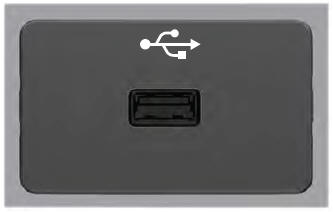
USB Port
WARNING: Driving while distracted can result in loss of vehicle control, crash and injury. We strongly recommend that you use extreme caution when using any device that may take your focus off the road. Your primary responsibility is the safe operation of your vehicle. We recommend against the use of any hand-held device while driving and encourage the use of voice-operated systems when possible. Make sure you are aware of all applicable local laws that may affect the use of electronic devices while driving.
USB A