
Lincoln Corsair: Adaptive Cruise Control / Switching Adaptive Cruise Control On and Off
Lincoln Corsair 2020-2026 Owners Manual / Adaptive Cruise Control / Switching Adaptive Cruise Control On and Off
The cruise controls are on the steering wheel.
Switching Adaptive Cruise Control On
 Press the button to set the
system
in standby mode.
Press the button to set the
system
in standby mode.
The indicator, current gap setting and set speed appear in the information display.
Switching Adaptive Cruise Control Off
 Press the button when the system
is in standby mode, or switch the
ignition off.
Press the button when the system
is in standby mode, or switch the
ignition off.
Note: You erase the set speed when you switch the system off.
Automatic Cancellation or Deactivation
The system may cancel if:
- The tires lose traction.
- You apply the parking brake.
The system may cancel and set the parking brake if:
- You unbuckle the seatbelt and open the driver door after you stop your vehicle.
- Your vehicle is at a stop continuously for more than three minutes.
The system may deactivate or prevent activating when requested if:
- The vehicle has a blocked sensor.
- The brake temperature is too high.
- There is a failure in the system or a related system.
 Adaptive Cruise Control Limitations
Vehicles With: Adaptive Cruise Control With Lane Centering
Adaptive cruise control limitations apply to
lane centering unless stated otherwise or
contradicted by a lane centering limitation...
 Setting the Adaptive Cruise Control Speed
Drive to the speed you prefer.
Press either button to set the
current speed.
Take your foot off the accelerator pedal.
The indicator, current gap setting and set
speed appear in the information display...
Other information:
Lincoln Corsair 2020-2026 Owners Manual: Under Hood Overview - 2.5L, Plug-In Hybrid Electric Vehicle (PHEV)
Windshield washer fluid reservoir. See Washer Fluid Check A. Low temperature coolant cap. See Engine Coolant Check. High temperature coolant cap. See Engine Coolant Check. Engine oil filler cap. See Engine Oil Check. Engine oil dipstick. See Engine Oil Dipstick...
Lincoln Corsair 2020-2026 Service Manual: Removal and Installation - Rocker Panel Inner Reinforcement
Special Tool(s) / General Equipment Resistance Spotwelding Equipment Scraper for Straight Edges Hot Air Gun Spot Weld Drill Bit Locking Pliers Materials Name Specification Metal Bonding AdhesiveTA-1, TA-1-B, 3M™ 08115, LORD Fusor® 108B, Henkel Teroson EP 5055 - Seam SealerTA-2-B, 3M™ 08308, LORD Fusor® 803DTM - Removal ..
Categories
- Manuals Home
- 1st Generation Lincoln Corsair Owners Manual
- 1st Generation Lincoln Corsair Service Manual
- Automatic Transmission - 8-Speed Automatic Transmission – 8F35/8F40
- Opening and Closing the Hood
- Overhaul - Main Control Valve Body
- New on site
- Most important about car
360 Degree Camera Cameras
Locating the Rear View Camera
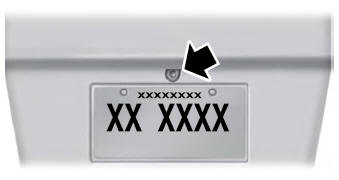
The rear view camera is on the tailgate.
Locating the Front View Camera

Copyright © 2026 www.licorsair.com