
Lincoln Corsair: Network Connectivity
Lincoln Corsair 2020-2026 Owners Manual / Network Connectivity
 Vehicle Identification
Locating the Vehicle Identification Number
The vehicle identification number is on the
left-hand side of the instrument panel.
Note: In the illustration, XXXX is
representative of your vehicle identification
number...
 Connecting the Vehicle to a Mobile Network
What Is the Modem
The modem allows you to connect your
vehicle to the Internet to use when you are
on the road.
If you enable the modem using the Lincoln
Way app, you can access the following
services:
Locating and remotely starting, locking
and unlocking your vehicle...
Other information:
Lincoln Corsair 2020-2026 Service Manual: Diagnosis and Testing - DTC Chart and Pinpoint Tests - 2.0L EcoBoost (177kW/240PS) – MI4
Diagnostic Trouble Code (DTC) Chart Diagnostics in this manual assume a certain skill level and knowledge of Ford-specific diagnostic practices.REFER to: Diagnostic Methods (100-00 General Information, Description and Operation). Module DTC Description Action PCM P0657:00 Actuator Supply Voltage 'A' Circuit/Open: No Sub Type Information GO to Pinpoint Test A PCM P0657:00 ..
Lincoln Corsair 2020-2026 Service Manual: Diagnosis and Testing - Evaporative Emissions
Diagnostic Trouble Code (DTC) Chart Diagnostics in this manual assume a certain skill level and knowledge of Ford-specific diagnostic practices. REFER to: Diagnostic Methods (100-00 General Information, Description and Operation). Module DTC Description Action PCM P00FE:00 EVAP System Tank Vapor Line Restricted/Blocked: No Sub Type Information GO to Pinpoint Test HX PCM P0..
Categories
- Manuals Home
- 1st Generation Lincoln Corsair Owners Manual
- 1st Generation Lincoln Corsair Service Manual
- Opening and Closing the Hood
- Overhaul - Main Control Valve Body
- Capacities and Specifications - 2.0L
- New on site
- Most important about car
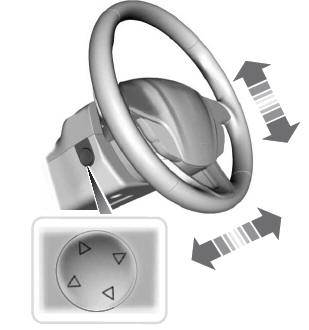
Adjusting the Steering Wheel - Vehicles With: Power Adjustable Steering Column
WARNING: Do not adjust the steering wheel when your vehicle is moving.
Note: Make sure that you are sitting in the correct position.

Copyright © 2026 www.licorsair.com